Project · Completed
Running Gemma 4 on an AMD BC-250 with Ollama
A practical path for running Gemma 4 E2B locally on an AMD BC-250 mini PC with CachyOS, Ollama, and llama-benchy.
Watch The Build
Gemma 4 AI on a $140 BC250 It Got Messy
Build Guide
Run these steps from the BC-250 unless the step specifically says to connect from your main machine.
Prerequisites
- AMD BC-250 running CachyOS
- SSH access from a remote machine
- Internet connection
1) Enable SSH on the BC-250
Install OpenSSH, start the daemon, allow SSH through UFW if you use it, then check the machine IP address.
Install OpenSSH
sudo pacman -S opensshEnable and start SSH
sudo systemctl enable --now sshdAllow SSH through UFW
sudo ufw allow ssh
sudo ufw reloadFind the BC-250 IP address
ip a2) Connect from your main machine
Replace the username and IP address with the account and address from your BC-250.
SSH into the BC-250
ssh username@192.168.x.x3) Install Ollama
Install Ollama and enable the service so it is ready for local model serving.
Install Ollama
curl -fsSL https://ollama.com/install.sh | shEnable and start Ollama
sudo systemctl enable --now ollama4) Pull Gemma 4 E2B
Gemma 4 E2B is a 7.2GB Mixture of Experts model, which fits the BC-250's 8GB shared VRAM allocation better than larger local models.
Pull the model
ollama pull gemma4:e2b5) Test the model
Run a quick prompt before benchmarking so you know the model is installed and responding.
Run a quick test prompt
ollama run gemma4:e2b "Explain how a CPU and GPU work together when running an AI model. Keep it concise."6) Install llama-benchy
Install the tooling, clone llama-benchy, and sync the Python environment with uv.
Install Python, Git, and uv
sudo pacman -Syu python git uv --noconfirmClone llama-benchy
git clone https://github.com/eugr/llama-benchy.gitSync the benchmark environment
cd llama-benchy
uv sync7) Run the benchmark
Point llama-benchy at Ollama's OpenAI-compatible local endpoint and test Gemma 4 E2B.
Benchmark Gemma 4 E2B
uv run llama-benchy --base-url http://localhost:11434/v1 --model gemma4:e2bResults
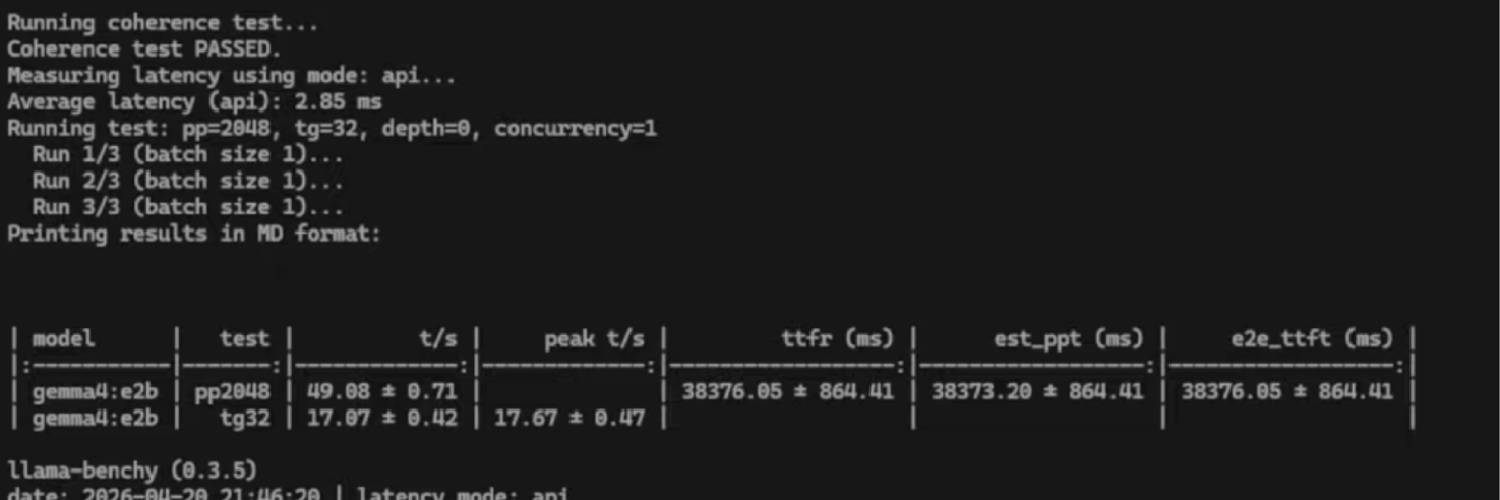
- Average API latency: 2.85 ms
- Prompt processing: 49 tokens per second
- Token generation: 17 tokens per second
- Hardware: AMD BC-250 integrated GPU with 8GB shared VRAM
| Model | Test | Speed | Peak | Notes |
|---|---|---|---|---|
| gemma4:e2b | pp2048 | 49.08 t/s | - | Prompt processing |
| gemma4:e2b | tg32 | 17.07 t/s | 17.67 t/s | Token generation |
Mistake Log
What Got Messy
The part of the build log where the clean version gets honest.
SSH was blocked before the real work started
- What happened
- The BC-250 was reachable on the network, but the first remote workflow stalled because the firewall was blocking SSH.
- Fix
- Opened SSH through the firewall, reloaded UFW, confirmed the machine IP, and then connected from the main machine.
- Lesson
- Remote lab work starts with boring network plumbing. Confirm SSH before blaming the AI stack.
The first Gemma pulls were the wrong fit
- What happened
- The first pull attempt failed because the model manifest did not exist, then the larger E4B download proved too big for the BC-250's 8GB VRAM split.
- Fix
- Dropped down to Gemma 4 E2B, which landed at roughly 7.2GB and fit the hardware better.
- Lesson
- Model names and VRAM math matter. On this box, the useful answer was the model that fit, not the model that sounded biggest.
Ollama fell back to CPU before Vulkan was enabled
- What happened
- The first status check showed zero VRAM use because experimental Vulkan support was disabled, so Ollama was not using the BC-250 integrated GPU.
- Fix
- Enabled Vulkan support and checked Ollama status again before treating the benchmark numbers as meaningful.
- Lesson
- A model can run and still be using the wrong hardware. Always verify VRAM/GPU use before benchmarking.
The BC-250 went to sleep and killed the SSH session
- What happened
- The machine slept during setup and would not wake back up cleanly, which dropped the SSH session mid-project.
- Fix
- Restarted the BC-250, reconnected over SSH, and continued after disabling sleep became an obvious follow-up task.
- Lesson
- Headless test boxes need sleep settings handled early. Otherwise the lab machine quietly leaves the lab.
Benchmark tooling needed a package mirror refresh
- What happened
- Installing the Python and uv tooling did not go cleanly at first because the CachyOS package mirrors were out of sync.
- Fix
- Synced the package database first, then installed Python, Git, and uv before cloning and syncing llama-benchy.
- Lesson
- If an install command fails on a rolling distro, refresh the package database before rewriting the whole plan.
The benchmark needed context, not just numbers
- What happened
- llama-benchy produced several timing values, including a cold first-token delay around 38 seconds and warmed-up generation around 17 tokens per second.
- Fix
- Kept the clean results table for quick reading and the original terminal screenshot as proof of the run.
- Lesson
- Local AI results are easier to trust when the table explains the takeaway and the screenshot preserves the messy evidence.
Build Notes
This guide covers the exact local AI flow: enable SSH on the BC-250, connect from a main machine, install Ollama, pull Gemma 4 E2B, and benchmark the result with llama-benchy.
The BC-250 is a strange but useful little lab box. With CachyOS installed and 8GB of shared VRAM available to the integrated GPU, Gemma 4 E2B lands in the sweet spot for a small local model test.
The goal here is not a cloud-scale AI rig. The goal is a repeatable after-hours lab setup that proves what this hardware can actually do.